

The search term report is critical for identifying search terms that generate sales and the ones that are wasting your money.1
Start With Setting The Right Goals2
For effective reporting, approach your Amazon reports with your strategic purpose in mind. Do you want to boost your revenue? Are you aiming to raise awareness?
Whatever your goal is, write it down before you begin studying your reports and keep it visible at all times. This allows you to have a consistent perspective when looking at your metrics. Furthermore, this offers you an excellent indication of how realistic your goals are.
Keeping your aim in mind also allows you to make sound judgments about your measurements. If you’re getting closer to your objective over time, you know your performance is adequate for what you’re aiming for.
Trend Analysis
You can’t make informed optimization decisions for your campaigns moving ahead until you have a thorough understanding of previous cycles and trends. This is especially true for products with seasonal data.

Systematic Test Cadence3
Full-service agencies run perpetual testing cycles, launching A/B experiments on bids, creatives, and match types weekly to identify winners. They use “waterfall keyword migration,” testing broad/phrase autos for 4-6 weeks before promoting high-performers to exact-match with aggressive bids. Gold panning campaigns low-bid broad nets test loosely relevant terms at scale, adding $35k+ sales at 14% ACoS in real cases.
Daily checks handle intraday patterns via Amazon Marketing Stream, with bi-weekly reviews, tweaking for statistical significance. Quarterly full audits benchmark against break-even ACoS, prioritising top/revenue drivers.
AiHello’s AutoPilot embodies this cadence automatically: AI analyses hourly data to harvest keywords from autos, transfers converters (e.g., 1+ sales) to manuals, and runs A/B bid tests daily toward your ACoS target. No manual scheduling set once; dayparts bids by peak hours, replicates waterfall logic, and iterates like an agency team.
Search Term Report1
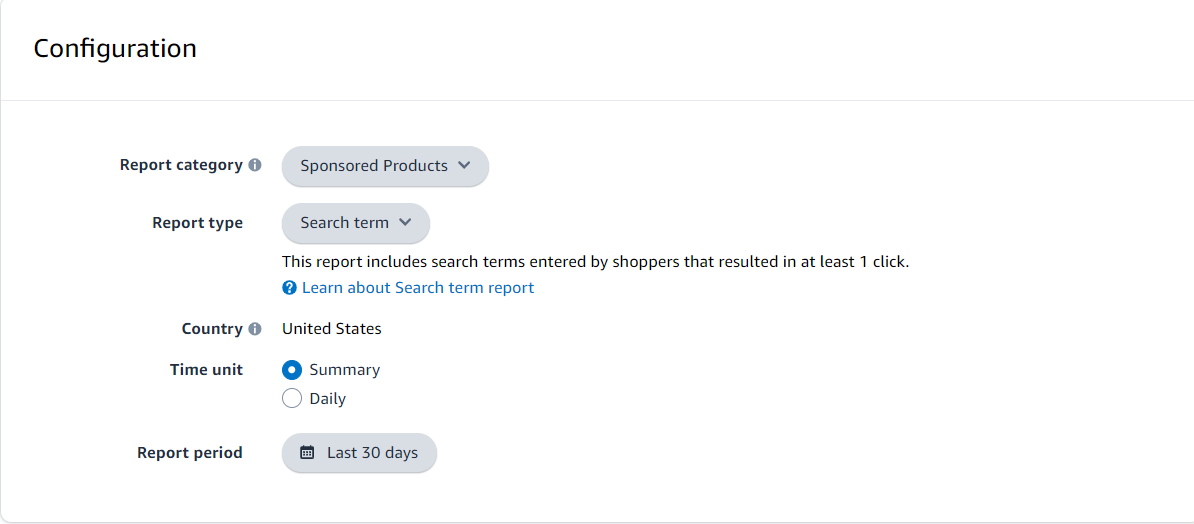
Select Measurements & Reporting from the sidebar.
Choose Sponsored ads reports.
Create a search term report for the last 30 days.
When you see search terms that brought in significant sales at a low ACoS, you should increase their bids if you’re already targeting them.
If you’re not yet targeting these high-performance search terms, add them to your campaigns.
Additionally, you can find search terms with high spending but no sales in your search term report. Add these as negative keywords to avoid wasted spend.
Campaign Performance Report
The campaign performance report provides a comprehensive overview of your campaigns, including impressions, clicks, spend, sales, and ACoS.
You can get your campaign performance report in the Sponsored ads reports tab inside seller central.
Advertising > Campaign Manager > Measurement & Reporting.
When auditing your campaigns, review the impressions and clicks to ensure your ads are getting sufficient visibility and engagement.
If impressions are low, consider increasing your bids and adding more relevant keywords.
Great Amazon PPC managers can communicate effectively.4
After you’ve put in the time and effort on your client’s campaigns and are seeing results, you must properly communicate with them about what’s going on in their account in a way they can understand. It’s just as crucial to have PPC knowledge as it is to be able to keep strong contact with a client.
You may have enough Amazon PPC management experience to think what you’re doing is self-explanatory, but keep in mind that your customer is unlikely to have the same level of knowledge. Make it crystal apparent what their campaigns are doing and how they are affecting them.
Being a good communicator also includes having difficult conversations with clients. You must be able to politely steer them back in the proper path if their goal is too aggressive or not aggressive enough, or if their PPC goals are mismatched with what they want to accomplish long-term.